Overview
The Advvy Add-in acts as a bridge between Microsoft Excel and the Advvy platform, enabling seamless two-way communication. It allows you to:
Bring Advvy data into Excel for detailed analysis and manipulation.
Push Excel data back into Advvy, keeping campaign and media plan records synchronized.
This integration streamlines workflows by letting you manage media planning and campaign data directly within Excel, while maintaining Advvy as the single source of truth.
Getting the Advvy Add-in
Open Microsoft Excel.
Navigate to Insert → Get Add-ins.
In the search bar, type "Advvy".
Click Install.
Once installed, the Advvy Add-in tab will appear in Excel’s ribbon.

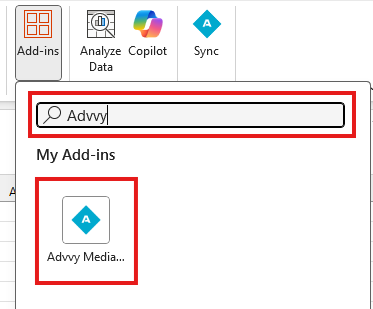
Add-in Buttons Explained
Connecting to an Environment
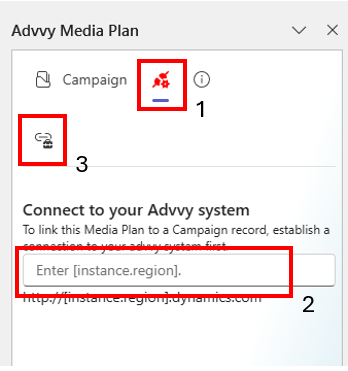
When opening the Advvy Add-in for the first time, you’ll see two tabs at the top of the pane:
Campaigns
Environment icon (connection icon next to Campaigns)
Steps to Connect:
Click the Environment icon.
Enter your environment link (the unique URL for your agency or company’s Advvy instance).
Click Test Connection.
If successful, you will be prompted to sign in using your Advvy credentials.
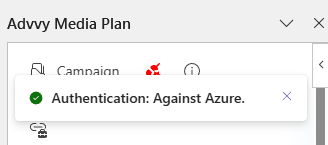
Upon successful login, a toast notification will appear:
✅ Authentication: Against Azure
This indicates your connection to the environment is active.
Connecting to a Campaign
Once connected to your environment, the Add-in automatically directs you to the Campaigns page.
To connect:
Use the search bar to type the campaign name you want to connect to.
⚠️ The campaign must already exist in Advvy.
Double-click the campaign name to connect.
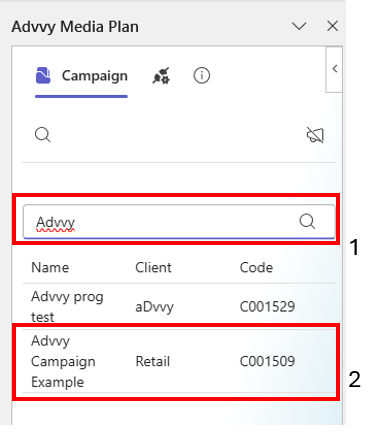
You are now linked directly to that campaign’s data.
To switch campaigns:
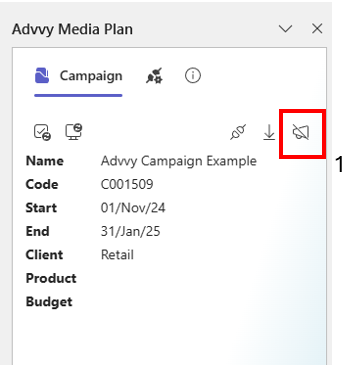
Click the Clear icon on the Add-in to disconnect the current campaign.
Follow the above steps to search and connect to a campaign.
Advvy Reference Data Tab
The Advvy Reference Data sheet is the foundational dataset that powers all media planning functionality within Advvy.
It is automatically populated through the Advvy Add-in, which pulls key lookup and structural data from the connected campaign environment.
This sheet serves as the master lookup table for all standardised data used in Advvy media plans.
It ensures consistency and integrity across campaign configurations, dropdown selections, rate structures, and validation logic — all of which are critical to how the media plan functions.
For more information regarding Reference Data, please refer to the Advvy Reference Data article. - Advvy Reference Data
Best Practices
Always verify your environment connection before importing or exporting data.
Regularly refresh campaign data to ensure you are working with the latest version from Advvy.
Disconnect from a campaign when switching clients or projects to avoid overwriting data.
Troubleshooting
| Issue | Possible Cause | Solution |
|---|---|---|
| Unable to connect to environment | Incorrect or expired environment URL | Verify the URL and re-enter it under the Environment tab |
| "B2B Authentication" fails | Network or login issue | Log out and sign in again; ensure you have access to your agency's Advvy instance |
| Campaign search not working | Campaign doesn’t exist in Advvy; incorrect environment | Confirm campaign exists and is named correctly; verify you are connected to the correct environment |
| Data not syncing | Excel connection timeout | Reconnect via the Environment icon and refresh data |
Was this article helpful?
That’s Great!
Thank you for your feedback
Sorry! We couldn't be helpful
Thank you for your feedback
Feedback sent
We appreciate your effort and will try to fix the article