Overview
Advvy uses publicly hosted image links for client logos to ensure consistent branding across all client-facing outputs.
Client logos are displayed in multiple places, including:
Media Buying Authorisations (MBAs)
MBA approval emails
Client Portal views
Exported and generated documents
To ensure logos always render correctly for all users, Advvy requires logos to be hosted using public links.
What Is a Public Link?
A public link is a direct URL to an image that:
Can be accessed by anyone in a browser
Does not require authentication or login
Is not restricted by organisational permissions
Does not expire
If a logo can be opened in an incognito or private browser window without signing in, it is considered a valid public link.
Why Advvy Requires Public Links for Client Logos
Client logos must be accessible to:
External clients
Client email systems
Document generation services
Portal users who are not authenticated against internal systems
Because MBA documents and emails are generated and delivered outside of internal networks, logos hosted behind authentication will fail to load.
Using public links ensures:
Logos always display correctly in MBAs
Branding is consistent across emails and documents
No broken images for clients or approvers
Fewer support issues related to missing branding
Approved Ways to Host Client Logos
There are many acceptable ways to host client logos, as long as the image is publicly accessible.
Common Options
Public image hosting services (e.g. Imgur)
Public website or CDN URLs
Cloud storage with explicit public access enabled
Imgur is commonly used because it is:
Simple to use
Reliable
Publicly accessible without login
Non-Approved Options (Do Not Use)
The following options should not be used for client logos:
❌ SharePoint (requires authentication)
❌ OneDrive private or expiring links
❌ Google Drive links that require sign-in
❌ Internal file systems or intranet URLs
If a logo requires authentication at any stage, it will not render correctly in Advvy outputs.
How Client Logos Are Used in Advvy
Once configured, client logos are automatically used in:
MBA document templates
MBA approval emails
Client Portal views
Exported reports (where configured)
No additional setup is required once the public link is saved.
Where to Configure Client Logos
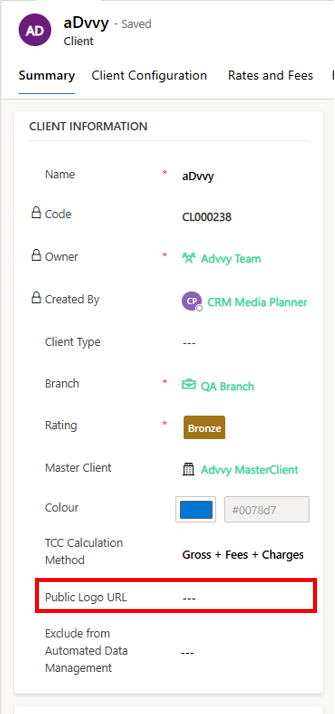
Client logos are configured on the Client record:
Navigate to Clients in Advvy
Open the relevant Client record
Paste the public image URL into the Public Logo URL field
Save the record
The logo will be applied immediately to all applicable outputs.
Best Practices
Test the logo URL in an incognito browser before saving
Use high-quality PNG or JPG images
Avoid logos with transparent backgrounds if exporting to PDF
Do not delete or move hosted images after configuration
Keep branding files up to date when clients rebrand
Was this article helpful?
That’s Great!
Thank you for your feedback
Sorry! We couldn't be helpful
Thank you for your feedback
Feedback sent
We appreciate your effort and will try to fix the article