Connecting to an Environment
When opening the Advvy Add-in for the first time, you’ll see two tabs at the top of the pane:
Campaigns
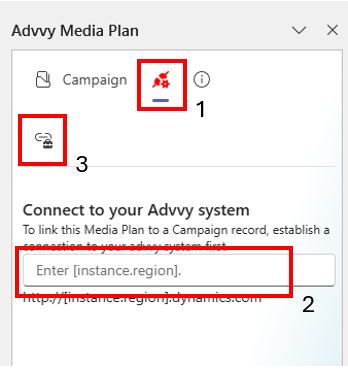
Environment icon (connection icon next to Campaigns)
Steps to Connect:
Click the Environment icon.
Enter your environment link (the unique URL for your agency or company’s Advvy instance).
Click Test Connection.
If successful, you will be prompted to sign in using your Advvy credentials.
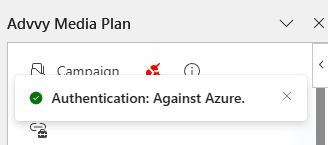
Upon successful login, a toast notification will appear:
✅ Authentication: Against Azure
This indicates your connection to the environment is active.
Was this article helpful?
That’s Great!
Thank you for your feedback
Sorry! We couldn't be helpful
Thank you for your feedback
Feedback sent
We appreciate your effort and will try to fix the article