How to: Review and Submit an MBA

Modified on Tue, 20 Jan at 9:52 PM

Overview

Once an MBA (Media Buying Agreement) has been generated, it must be reviewed and submitted for client approval.

This process ensures that all media activity is accurate before being formally authorised and shared with the client via the Advvy Client Portal.


Step 1: Review MBA Content

After generating an MBA:

  1. Open the newly created MBA record from the Campaign

  2. Review all details carefully, including:

    • Media activity and values

    • Dates and flighting

    • Fees and totals

    • Supplier and market information

Ensure that all information matches the intended approved media plan.


Step 2: Submit the MBA for Client Approval

If the MBA content is correct:

  1. Assign or confirm the Client Contact on the MBA

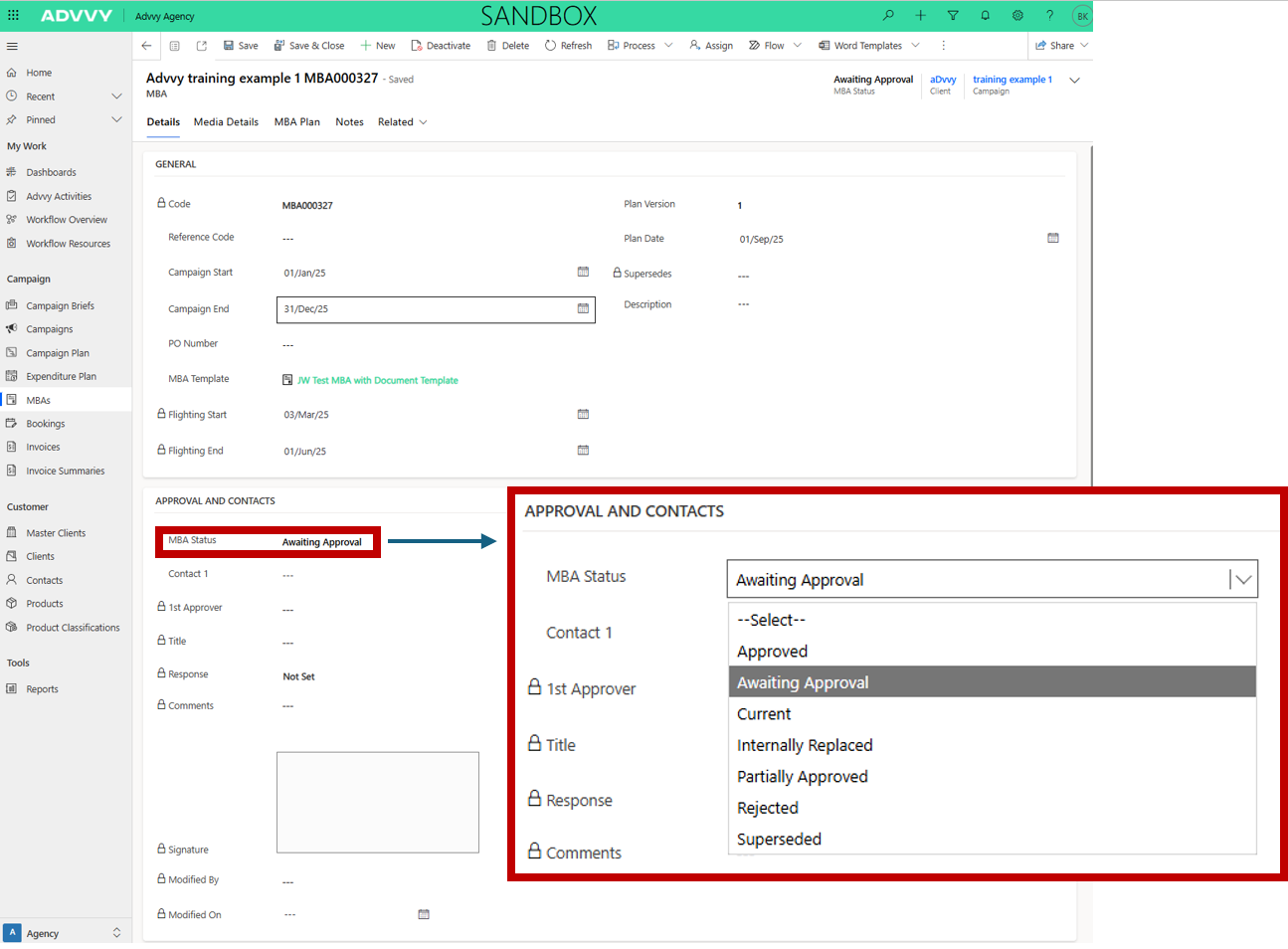
  2. Change the MBA Status to Awaiting Approval

What Happens Next

Changing the status to Awaiting Approval automatically triggers the following actions:

  • An email is sent to the assigned Client Contact containing a link to the Client Portal

  • The Advvy user who made the status change is CC’d on the email

  • The MBA report is automatically generated (where report generation is configured)

At this point, the MBA is formally submitted for client review and approval.


Step 3: If MBA Content Is Incorrect

If you identify issues with the MBA content, do not submit it for approval.

Instead, choose one of the following options:

Option 1: Mark the MBA as Internally Replaced

  • Change the MBA status to Internally Replaced

  • This indicates the MBA is no longer valid and should not be approved

Option 2: Regenerate the MBA

  1. Return to Campaign Plan+

  2. Adjust filters or correct the underlying media data

  3. Generate a new MBA using the updated information

The newly generated MBA will reflect the corrected data and can then be reviewed and submitted.


Important Things to Be Aware Of

  • Only MBAs with status Awaiting Approval are sent to clients

  • Regenerating an MBA does not update existing MBAs

  • Always review MBA content before submitting for approval


MBA Status Definitions

The table below explains each MBA status and how it is used in the approval process.

StatusDescription
ApprovedClient has reviewed and approved the MBA. The MBA is visible in the Client Portal.
Awaiting ApprovalMBA is ready for client review. Changing to this status triggers automated email notifications and report generation.
CurrentMBA is active internally but not yet visible to the client.
Internally ReplacedMBA was replaced before client approval and is hidden from the client.
Partially ApprovedClient has approved only part of the MBA. Follow-up or a revised MBA may be required.
RejectedClient rejected the MBA. Corrections are required before resubmission.
SupersededMBA has been replaced by a newer version. Retained for reference and hidden from the client.


Was this article helpful?

That’s Great!

Thank you for your feedback

Sorry! We couldn't be helpful

Thank you for your feedback

Let us know how can we improve this article!

Select at least one of the reasons
CAPTCHA verification is required.

Feedback sent

We appreciate your effort and will try to fix the article