Overview
What this article covers
Campaign Flightings in Advvy represent the scheduled time periods during which media activity is active within a campaign. Flighting data is automatically synced from your media plan and stored on a weekly basis, keeping your campaign timelines accurate and aligned with your planning inputs.
This article explains what Flightings are, how they are created, how to access them, and what data they contain.
What Are Campaign Flightings?
The building blocks of your campaign's delivery timeline
Campaign Flighting
Per-campaign record · Automatically created on media plan sync
A Campaign Flighting captures a single scheduled period of media activity within your campaign. Each flighting stores the active dates, weekly delivery breakdown, and all planning data synced from your Excel media plan. Flightings are the structural backbone of your campaign's timeline.
Created By
Media plan sync (automatic)
Stored As
Weekly time periods
Updated When
Each new sync replaces previous data
Used For
Reporting · Pacing · Integrations
⚠️Important: Flightings are created automatically when you sync your media plan. You should not create them manually — manual records will not be linked correctly and may cause data inconsistencies.
How Campaign Flightings Are Created
Flightings flow automatically from your media plan into Advvy
Trigger
Media plan is synced from Excel
You click Sync in the Advvy Add-in
AutomaticMedia Plan (Excel)
Your planned media
activity with dates
→
Sync via Add-in
Data transferred
to Advvy
→
Campaign Flightings
Weekly records created
per media line
→
Reports & Integrations
Timelines, pacing,
external systems
Tip: Each time you sync an updated media plan, the existing flighting records are replaced with the latest data. This keeps everything in Advvy consistent with your Excel file.
Why Campaign Flightings Matter
Flightings power several key areas across the platform
| Area | How Flightings Are Used |
|---|
| Weekly & Monthly Reporting | Flightings provide the time-based data that powers spend breakdowns in Campaign Plan+ and the Expenditure Plan. |
| Timeline & Pacing | Flightings show when media activity starts and ends, giving you a clear view of campaign pacing over time. |
| Data Consistency | Because Flightings are synced from your media plan, they ensure what you see in Advvy always matches what you planned in Excel. |
| Workflow & Delivery Tracking | Flightings feed into campaign workflows so your team can track delivery progress against the planned schedule. |
| External System Integrations | Flightings store codes and identifiers used by downstream systems such as SMD and Pegasus for billing and reconciliation. |
How to Access Campaign Flightings
Find flighting data for any campaign in four steps
1
Go to CampaignsClick Campaigns in the left-hand navigation menu.
2
Open the CampaignFind and click on the campaign you want to view. This opens the Campaign record.
3
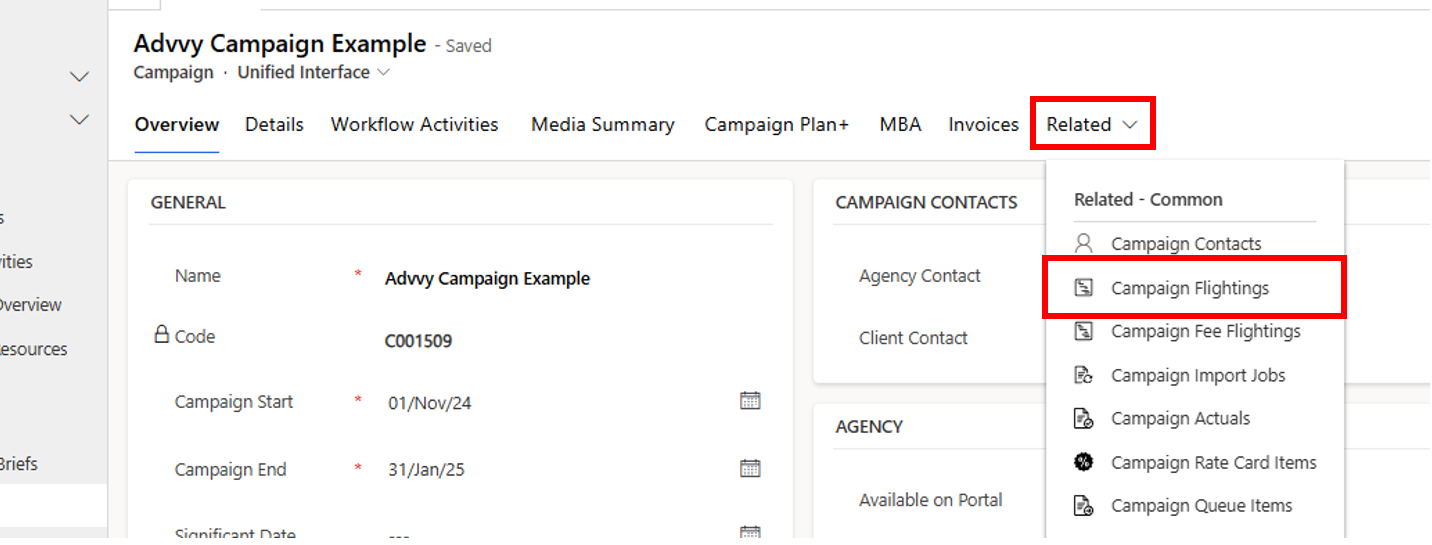
Go to the Related tabClick the Related tab at the top of the Campaign record.
4
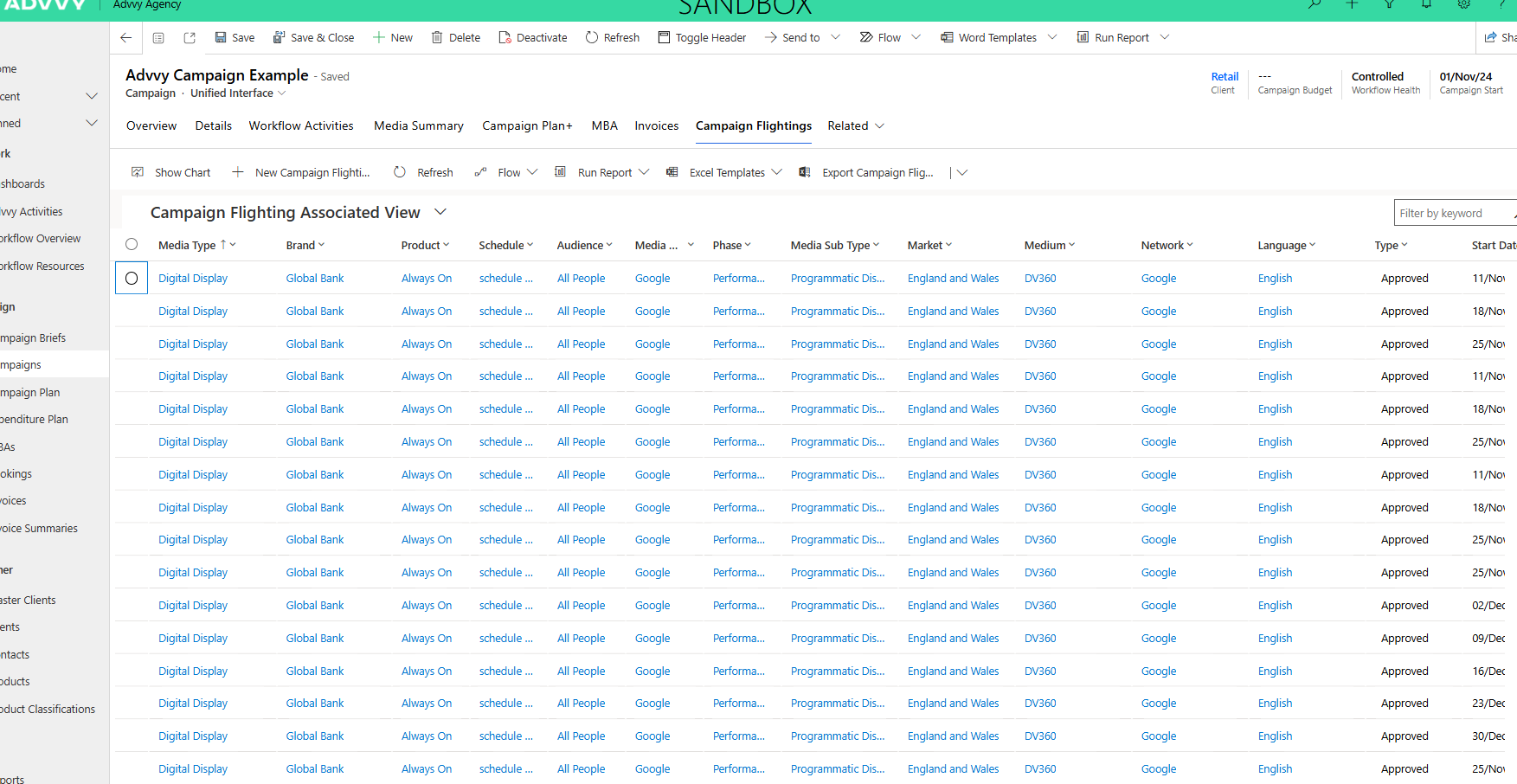
Select Campaign FlightingsIn the Related tab, click Campaign Flightings. This opens the flighting summary table for this campaign.
The Campaign Flightings Summary Table
A high-level view of all flighting records for a campaign
The summary table shows one row per flighting record. You can use it to quickly review campaign timing without opening each record individually.
| Column | What It Shows |
|---|
| Start Date | The beginning of the flighting period (weekly). |
| End Date | The end of the flighting period. |
| Flighting Identifiers | Reference codes that link the flighting to the media plan line item. |
| Status | The current state of the flighting record (e.g. active, completed). |
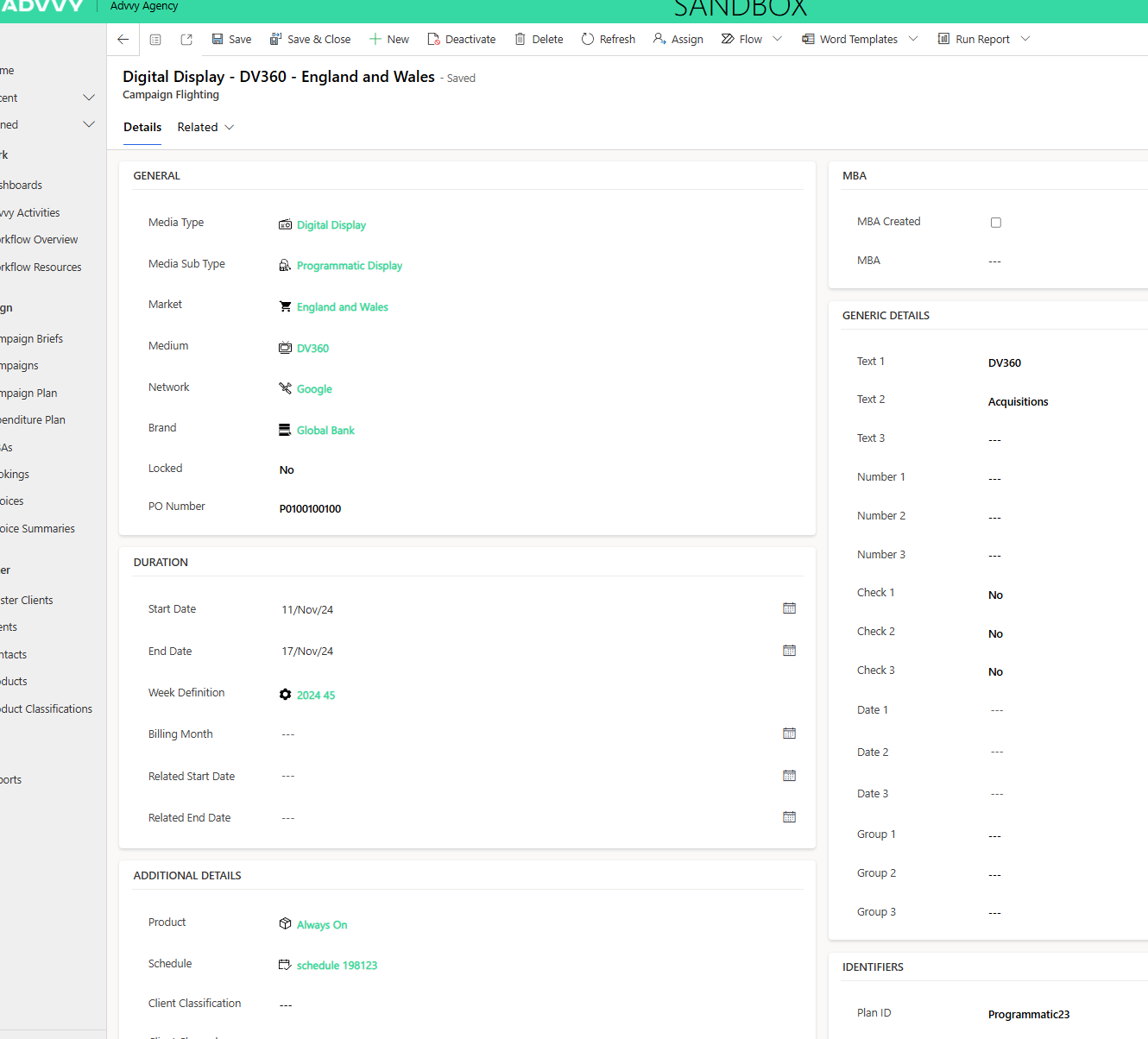
Tip: To see the full details of any flighting, double-click the row in the summary table. This opens the detailed flighting record with all synced data from your media plan.
What's Inside a Flighting Record
The data stored on each individual Campaign Flighting
When you open a flighting record, you'll see several groups of data — all synced automatically from your media plan.
| Data Group | What It Includes |
|---|
| Identifiers | External ID, Finance ID, Plan ID, and reference IDs used by downstream systems. |
| Descriptions | Placement descriptions, position details, and ad category or medium-related labels. |
| Performance Metrics | Impressions, clicks, views, conversions, and any other performance fields captured at the flight level. |
| External System Codes | SMD codes, Pegasus codes, and other mapping fields used for billing and reconciliation with external platforms. |
Key Takeaways
1
Flightings are your campaign's timeline. They capture the weekly schedule of all media activity within a campaign, synced directly from your media plan.
2
They are created automatically. Every time you sync your media plan from Excel, Advvy generates or updates the Campaign Flighting records — you don't need to create them manually.
3
Find them under the Related tab. Open your Campaign, go to the Related tab, and select Campaign Flightings to see the summary table.
4
Flightings power reporting and integrations. They feed into Campaign Plan+, the Expenditure Plan, workflow tracking, and external systems like SMD and Pegasus.
5
Syncing replaces previous data. Each new sync overwrites the existing flighting records, so your Advvy data always matches your latest media plan.